



Quick Summary
- Claude AI offers 45+ practical applications across personal, professional, educational, and enterprise contexts
- Businesses report 25-75% productivity improvements when implementing Claude AI workflows
- Key strengths include exceptional long-document handling (200,000-token context window), coding assistance, and content generation
- Claude AI prioritizes safety with advanced security measures and responsible AI frameworks
- Applications span from customer support automation to complex data analysis and creative problem-solving
Claude has introduced a dedicated “Use Cases” section on its website that curates practical examples of how people can use the AI assistant for research, writing, coding, analysis, and everyday tasks, available globally via claude.com. The hub organizes scenarios by category and goal, helping users understand what Claude can do and how to prompt it effectively, especially for work and personal projects. Each example highlights a concrete outcome—such as building a custom webpage or practicing case interviews with feedback—and walks users through how to collaborate with the AI step by step.
The new resource matters because many users still struggle to translate general “AI capabilities” into specific, reliable workflows for their jobs and side projects. By framing Claude around clearly described, repeatable use cases, Anthropic is positioning the assistant less as a generic chatbot and more as a flexible tool for targeted tasks in areas like business analysis, learning, and personal productivity. The move also aligns with a broader trend in AI where providers supplement raw models with guidance, templates, and domain-specific patterns to reduce trial-and-error for end users.
Categories and features
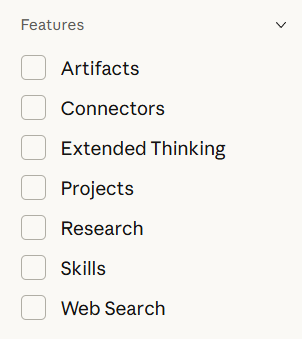
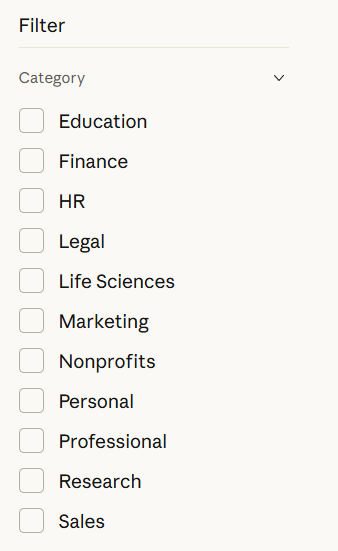
Claude use case category and features
The Use Cases hub organizes examples across ten distinct categories, allowing users to filter by industry, role, or personal context. Professional categories address specific workplace needs, while broader categories span multiple use types:
Professional categories:
- Education: Curriculum design, lesson planning, and student assessment materials
- Finance: Compliance documentation, financial analysis, and reporting workflows
- HR: Employee onboarding, policy documentation, and performance review frameworks
- Legal: Contract analysis, legal research, and compliance documentation
- Life Sciences: Patient education materials, research synthesis, and regulatory writing
- Marketing: Campaign planning, content creation, and audience analysis
- Nonprofits: Fundraising strategy, grant writing, and community engagement
- Sales: Lead qualification, proposal development, and customer communication
General categories:
- Personal: Learning projects, creative work, and individual productivity
- Professional: Cross-functional workplace tasks and collaboration
- Research: Literature review, data synthesis, and academic exploration
Feature filters
Each use case is tagged by Claude capabilities, helping users identify which features are demonstrated in specific examples:
- Artifacts: Creates interactive, editable content like code snippets, documents, and visual components that appear in a dedicated panel
- Connectors: Links Claude to external data sources, APIs, and third-party tools for real-time information access
- Extended Thinking: Enables deep, step-by-step reasoning for complex problems, with Claude "thinking out loud" before delivering answers—resulting in a 54% improvement on challenging coding tasks
- Projects: Organizes context, files, and custom instructions across multi-session workflows, maintaining continuity over time
- Research: Performs comprehensive information gathering with proper citations, combining multiple sources into structured reports
- Skills: Reusable, modular task components that encode organizational methods—such as report formats or communication protocols—so Claude automatically applies them when relevant
- Web Search: Retrieves real-time, factual information from the internet to supplement Claude's training data
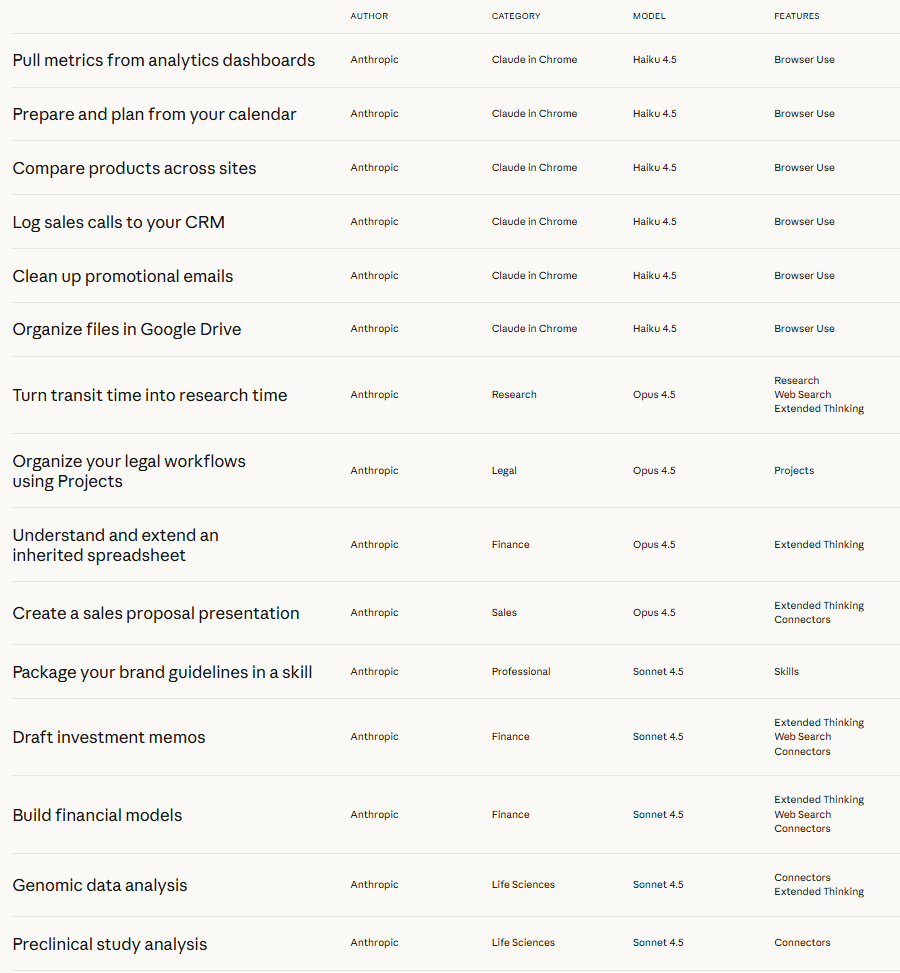
Research mode represents Claude's most comprehensive feature, combining extended thinking with web search and tool use to plan approaches thoughtfully, execute multi-source information gathering, and produce longer reports with citations. Skills, launched in October 2025, allow organizations to codify expertise so teams can apply consistent methods across projects. Together, these feature filters transform the Use Cases hub into a navigable library where users can find examples matching their exact workflow needs.
Anthropic also ties the hub into its broader push around “Claude for work,” where guides outline how teams can apply the model across departments such as engineering, human resources, marketing, and product. Industry analyses of Claude usage suggest that common business cases include application development assistance, content creation, academic research, and strategic planning, which mirror many of the examples highlighted in the library. For individual users, companion resources emphasize writing support, research synthesis, customer support automation, and coding guidance as accessible starting points.


